Module 5: Sales & Marketing

Learning Outcomes:
After completing this module, you will be able to:
- Create your own marketing plan
- Build a brand and style guide for your business
- Create a website by using some free and paid tools and resources linked
Marketing plan and its components
A marketing plan is a strategic roadmap for how you communicate (online and offline) with your target audience to successfully promote your products or services. Marketing plans range from extremely basic to highly detailed, depending on what you want to accomplish.
Five elements of an effective marketing plan:
- Business goals
- Key metrics (how you quantify and measure success)
- Strategies (an overview of implementation and how that will achieve goals)
- Plan (the details of execution and the human resources, departments, and software that will be involved)
- Reporting (what reports of progress will include and/or look like)
What to include:
- Executive Summary
- Mission, Vision, and Core Values
- Target Market
- Products and Services (Features and Benefits)
- Marketing Channels
- Competitive Analysis
- Pricing Strategy
- Implementation Plan
- Breakdown of marketing budget/resources
Marketing plan templates
- https://blog.hubspot.com/marketing/marketing-plan-template-generator
- https://www.forbes.com/sites/davelavinsky/2013/09/30/marketing-plan-template-exactly-what-to-include/?sh=39587ab23503
- https://www.bdc.ca/en/articles-tools/entrepreneur-toolkit/templates-business-guides/marketing-plan-template
Persona Builder
A persona in the context of marketing refers to the ideal customer or customers for your business. They are defined by a mixture of any of the following attributes or activities:
- Demographic
- Shopping habits
- Location
- Job role / description
- Interest in product
- Need for product
HubSpot has a Make My Persona tool that can help you identify your customer personas.Make My Persona tool from HubSpot
How to Build a Brand Guide
Your brand consists of words, imagery, graphics, and non-verbal cues that your business communicates to the audience. More than seeing and hearing, your brand guideline will help to ensure that your customers feel good about your brand.
What to include:
- Audience Personas
- Competitive Analysis
- Brand Positioning
- Story of your Brand
- Mission, Vision, Values
- Boilerplates
- Messages
- Tone
- Brand Identity
- Colours, Logo, etc.
Style Guide
Your style guide might include grammar and web standards, copy patterns, voice and tone guidelines, content types with examples, a word list (and a blacklist), and brand basics. HubSpot provides a list of brand style guide examples.
Product Positioning
Product positioning is a form of marketing that presents the benefits of your product to a particular target audience. Through market research and focus groups, marketers can determine which audience to target based on favorable responses to the product.
Research can also determine which product benefits are the most appealing to them. Knowing this information helps streamline marketing efforts and create effective marketing messages that drive more leads and sales. It also helps differentiate the product or service from the competition in the marketplace.
Your product positioning should include:
- Mission
- Market category
- Customer pain points
- Company and product differentiators
- Brand identity
- Vision
If you’re in need of a quick template, here’s a basic product positioning statement that you can use as a first step: This product was created for [audience] that [need/want] [emotion or solution]. Our [company/product] is a [category/solution] that uniquely solves this by [features/benefits].
Ansoff Growth Matrix- Developed in 1957 by H. Igor Ansoff, the Ansoff Growth Matrix offers a simple and useful way to think about product and market development strategy. The matrix outlines four possible areas of opportunity for growth, which vary in risk:
- Market penetration
- Product development
- Market development
- Diversification
Website 101
To build a brand or e-commerce website, you need a minimum of two things: a business name and images. Apart from that, it is important to have content and a branding guideline. When you’re starting, it might not be feasible to hire a professional designer or marketer, and in that case, consult this guide to know about the tools and ways in which you can improve your brand’s online performance.
- Choose your website builder. You can choose either WordPress, Wix, Squarespace, etc. based on your requirements. If you are just starting out, and might not be able to pay for the builder, using a free option like WordPress (and the free hosting/domain offer mentioned below) will be the best option.
- Register your domain name. Your domain name is a key element of your online brand. It lets potential customers know what your website and business is all about. Make sure your domain name is easy to spell, has one or two words, and is relevant to your business.
- Pay for website hosting. There are a few paid website builders that cover the cost of hosting as well.
- Choose a theme. Once you complete steps 1-3, please sign up for the website builder of your choice, and select the desired theme. In this theme, you can now start populating your content.
- Test for accessibility and quality control. Double-check if your website is accessible on different devices and browsers, and you are ready to launch.
How to choose a domain name for your business
Choosing a domain name is an important step when starting your business. A good domain name shows credibility, it’s a pillar of your digital presence. Typically, a domain name is a shorter variation of the full business name. However, there are other variations you can try if you want a catchy domain name or if the name you want is already taken.
Here are a few real-life domain name examples:
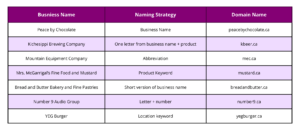
Tip: keep your domain name simple, brief and typable. Lengthwise, you should try to avoid names that are longer than two or three words. Aim for a sweet spot of between 5 and 14 characters. This will make it easier for your customers to remember and type into a web browser.
Choosing a domain extension
When choosing a domain name, you must also pick an appropriate extension – the section of your domain name to the right of the dot in a URL. Consider the following when deciding what domain extension is right for your website.
.CA or .com for your website?
Only Canadian businesses and individuals can register a .CA domain which signals your connection to Canada. Generic top-level domains like .com are more open for registration and search engines like Google won’t associate it with any specific country.
.CA is the ideal choice for businesses that…
- Sell primarily to Canadians
- Offer services to a specific geographic region in Canada (restaurants, hair salons, florists etc.)
- Feature Canada proudly as a central element of their brand
If you plan on expanding internationally, then it is best to get .CA and forward it to your .com domain. .CA will help you attract Canadian customers and .com will help your site rank better against other international results.
Why choose .CA for your website
- Score your desired domain name. With around 3 million .CA domain names registered in Canada—versus over 160 million .com domains internationally—there’s a far better chance the domain name you want for your business is available as a .CA.
- Drive site traffic. Your .CA domain name tells Google that your business and website are Canadian. This helps make it far more relevant to visitors searching for local Canadian results.
- Create a localized shopping experience for your customers. A .CA domain tells your customers that you charge in CAD dollars, ship to Canada, pay and collect Canadian taxes and you’re a local Canadian business.
You can register your .CA domain and launch your website today with Rebel.com’s Startup with .CA bundle. Get a free .CA domain, free WordPress website and a free professional email for one year! Getting online really can be that easy.
Tools and Resources
Small businesses have access to a number of free or paid tools that can help you grow your digital footprint and reach more potential customers. It’s easier than you think to get started.
- Google Analytics. Google Analytics is a powerful and free product that tracks all kinds of information about who visits you online and how they interact with your website, including:
- The city or country visitors are browsing from
- How long they stay on your website
- Which pages they visit the most
- Where they click through from
- What parts of your website they click on
- The most common routes visitors take through your website from page to page
- Google Ads. Google Ads is an online advertising tool that helps you attract people searching for products or businesses like yours. The process is simple:
- Write your ad copy
- Pick the keywords you’d like to target
- Set a daily maximum budget
- Select your campaign’s start and end dates
- Google My Business. Google My Business is a free online listing for your business that appears when users search for you on Google or Google Maps. It presents them with a quick summary of key facts, including:
A short introduction explaining what your business does
- Business address
- Business phone number
- Opening hours
- Website URL
- Google reviews
- Social media links
- Google Digital Garage.There is always more that businesses can do to stand out online, and that’s why it’s important to keep learning. If you’d like to pick up more digital marketing skills, Google Digital Garage offers lots of free courses in an easy-to-follow format.
Here are some of the digital marketing topics you can learn about:
- Making the most of social media
- Selling more products online
- Turning data into insights
- Building an online shop
- How to be noticed with search ads
SEO
Search engine optimization (SEO) is how you help customers find your business when they use search engines such as Google, Bing, and Yahoo. By building your site the right way and optimizing your keywords, you’ll drive more traffic to your page and generate more sales. SEO will help you grow your organic traffic, increase trust and credibility amongst your audience, and be a cost effective way to convert more customers.
- Use Google Adwords to find the right keywords for your business.
- Try focusing on your niche and unique offerings when creating content online.
- Be consistent with your social media posts but don’t overdo it. Create high-quality content that tells your story and educates your audience.
- Use scheduling software like Hootsuite and Later to have a social media content calendar.
- Use Google Analytics to track your progress.
Inbound and outbound sales
Inbound Sales
Inbound sales is a sales methodology that prioritizes the needs, challenges, goals and interests of individual buyers. Instead of focusing on closing the sale as soon as possible, inbound salespeople work to meet consumers where they are and then guide — not push — them through the decision-making process.
Outbound Sales
Outbound sales are the result of a prospecting effort to a potential customer who has not yet expressed interest in a product or service offered by the organization. The marketing team is responsible for generating inbound sales.
Customer Relationship Management
Customer relationship management (CRM) is the combination of practices, strategies, and technologies that companies use to manage and analyze customer interactions and data throughout the customer lifecycle. The goal is to improve customer service relationships and assist in customer retention and drive sales growth.
Revenue streams
A revenue stream is a source of revenue of a company or organization.
- Selling Assets
- Fees for Usage
- Subscription fees
- Renting, Leasing and Lending
- Licensing to 3rd parties
- Brokerage Fees
- Advertising Fees
Tools and Resources
Logo Builder
Social Media Tools
Buffer- Buffer is a popular scheduling tool that allows marketers to schedule posts across a variety of social media platforms. You can either tailor each post to each platform or publish the same one everywhere.
Design tools
- Adobe Creative Cloud
- (Adobe Spark for beginners)
- Canva.com
- Figma
Stock Photos
- https://www.pexels.com/
- https://unsplash.com/
- https://pixabay.com/
- https://blog.snappa.com/free-stock-photos/
- https://www.canva.com/photos/free/
- https://www.freeimages.com/
- https://burst.shopify.com/
Branding
Social Media
- https://buffer.com/?utm_source=social-blog&utm_medium=publish&utm_campaign=management-tools
- https://later.com/
- https://www.hootsuite.com/
- https://www.agorapulse.com/
- https://socialbee.io/?utm_medium=referral&utm_source=buffer.com&utm_campaign=best+smm
- https://www.sendible.com/
- https://eclincher.com/
- https://www.socialpilot.co/
- https://www.postplanner.com/
- https://coschedule.com/
- https://friendsplus.me/
- https://www.crowdfireapp.com/
Ecommerce
- https://www.bigcommerce.com/dm/sb-affiliate-v3/?irgwc=1&utm_term=w9M2-SWahxyLTsUwUx0Mo37FUkB1ht21p3crVY0&utm_content=185949&utm_campaign=317643&utm_medium=affiliates&utm_source=ImpactRadius
- https://www.wix.com/
- https://www.shopify.com/
- https://woocommerce.com/
- https://www.weebly.com/ca
CRM
Hubspot: HubSpot offers a free platform of marketing, sales, customer service, and CRM software — plus the methodology, resources, and support — to help businesses grow.
- Zendesk:Zendesk is a service-first CRM company that builds software designed to improve customer relationships
- Salesforce:Salesforce is an online solution for customer relationship management, or CRM. It gives all your departments — including marketing, sales, commerce, and service — a shared view of your customers with one integrated CRM platform.
- Capterra:Capterra, Inc. is a free online marketplace vendor serving as an intermediary between buyers and technology vendors within the software industry. The company assists consumers with selecting software for their needs with user reviews and research.
- Monday.com: Monday.com is a cloud-based platform that allows users to create their own applications and work management software.
Business Tools
- https://www.omnisend.com/
- https://www.campaignmonitor.com/
- https://www.feeds4.com/
- https://www.activecampaign.com/
- https://buffer.com/
- https://www.osiaffiliate.com/
- https://smile.io/
- https://www.usertesting.com/
- https://www.wishpond.com/
- https://www.klaviyo.com/
- https://www.buzzstream.com/
- https://www.exitbee.com/
- https://www.metrilo.com/
- https://www.storeya.com/
- https://instasize.com/
Analytics